
A business budget is one of the most important tools for managing your money. It helps you plan your income, control expenses, and make better financial decisions. Whether you run a small business, startup, or freelance business, having a budget can keep your finances on track.
The good news is that creating a business budget doesn’t have to be complicated. With a few simple steps, you can build a budget that supports your business goals and helps you avoid financial problems.
In this guide, you’ll learn how to create a simple business budget, what to include, common mistakes to avoid, and tips for keeping your budget accurate.
What Is a Business Budget?
A business budget is a financial plan that estimates how much money your business expects to earn and spend over a specific period, such as a month, quarter, or year.
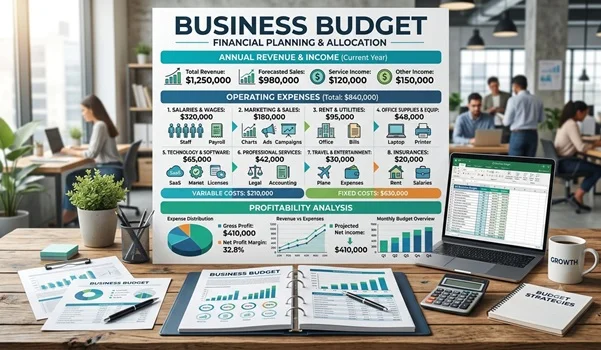
It allows you to compare planned income and expenses with actual results so you can make adjustments when needed.
Why Is a Business Budget Important?
Creating a business budget offers several benefits:
- Helps manage cash flow
- Prevents unnecessary spending
- Supports better financial decisions
- Sets realistic business goals
- Prepares for unexpected expenses
- Improves profitability
- Makes business growth easier to plan
Without a budget, it’s easy to lose track of where your money is going.
Step 1: Calculate Your Expected Income
The first step is estimating how much money your business is likely to earn during the budgeting period.
Your income may come from:
- Product sales
- Service revenue
- Consulting fees
- Subscription income
- Rental income
- Other business activities
If your income changes each month, use your average earnings from the past six to twelve months.
Example
| Income Source | Monthly Amount |
| Product Sales | $8,000 |
| Services | $3,000 |
| Other Income | $500 |
| Total Expected Income | $11,500 |
Step 2: List Fixed Expenses
Fixed expenses stay nearly the same every month.
Examples include:
- Office rent
- Employee salaries
- Insurance premiums
- Internet bills
- Loan payments
- Software subscriptions
- Website hosting
Since these costs are predictable, they are easier to budget.
Example
| Fixed Expense | Monthly Cost |
| Office Rent | $1,500 |
| Salaries | $3,000 |
| Internet | $100 |
| Insurance | $200 |
| Software | $150 |
| Total Fixed Expenses | $4,950 |
Step 3: Estimate Variable Expenses
Variable expenses change from month to month depending on your business activities.
Examples include:
- Marketing
- Packaging
- Transportation
- Raw materials
- Utility bills
- Repairs
- Office supplies
Review previous months to estimate these costs accurately.
Example
| Variable Expense | Monthly Cost |
| Marketing | $600 |
| Packaging | $350 |
| Transport | $250 |
| Utilities | $300 |
| Office Supplies | $150 |
| Total Variable Expenses | $1,650 |
Step 4: Include One-Time or Seasonal Expenses
Some business costs do not occur every month but should still be included in your annual budget.
Examples include:
- Equipment purchases
- Business licenses
- Annual software renewals
- Employee training
- Office renovations
- Tax payments
Planning for these expenses helps avoid financial surprises.
Step 5: Set Aside an Emergency Fund
Unexpected costs are part of running a business.
You may face:
- Equipment breakdowns
- Slow sales
- Emergency repairs
- Legal expenses
- Supply chain delays
Many experts recommend setting aside a portion of your monthly income for emergencies.
Even a small emergency fund can help your business continue operating during difficult times.
Step 6: Calculate Your Expected Profit
Now subtract your total expenses from your expected income.
Simple Formula
Expected Profit = Total Income − Total Expenses
Example
| Item | Amount |
| Total Income | $11,500 |
| Total Expenses | $6,600 |
| Estimated Profit | $4,900 |
This gives you a clear picture of your expected financial performance.
Step 7: Track Actual Spending
Creating a budget is only the beginning.
You should regularly compare:
- Planned expenses
- Actual expenses
If you notice overspending, identify the reason and make adjustments.
Monthly reviews help you stay financially disciplined.
Step 8: Update Your Budget Regularly
Businesses change over time.
You may:
- Hire new employees
- Increase marketing
- Launch new products
- Open new locations
- Face rising costs
Review your budget every month or quarter to keep it accurate.
Simple Business Budget Template
| Category | Budgeted | Actual |
| Income | $11,500 | |
| Fixed Expenses | $4,950 | |
| Variable Expenses | $1,650 | |
| Emergency Savings | $300 | |
| Total Expenses | $6,900 | |
| Net Profit | $4,600 |
This simple template works well for most small businesses.
Tips for Creating an Effective Business Budget
- Base your estimates on real financial data.
- Separate business and personal finances.
- Keep detailed expense records.
- Plan for seasonal changes.
- Include unexpected costs.
- Review your budget regularly.
- Avoid unrealistic income estimates.
- Reduce unnecessary expenses.
- Use accounting software if your business grows.
Common Business Budget Mistakes
Many new entrepreneurs make budgeting mistakes that affect business growth.
Avoid these common errors:
Ignoring Small Expenses
Small purchases can add up over time.
Overestimating Revenue
Always estimate income conservatively.
Forgetting Taxes
Tax payments should always be included in your budget.
Not Planning for Emergencies
Unexpected costs happen in every business.
Failing to Review the Budget
A budget should be updated regularly to reflect current business conditions.
Best Tools for Business Budgeting
You don’t always need expensive software to create a budget.
Popular options include:
- Microsoft Excel
- Google Sheets
- QuickBooks
- Xero
- Zoho Books
- Wave Accounting
Choose a tool that matches your business size and needs.
Signs Your Business Budget Needs Improvement
Your current budget may need adjustments if:
- You frequently run out of cash.
- Expenses are higher than expected.
- Profits continue to decline.
- Bills are paid late.
- Business debt is increasing.
- Financial goals are not being achieved.
Regular reviews help identify these problems early.
Benefits of Following a Business Budget
A well-managed budget can help you:
- Improve cash flow
- Increase profitability
- Reduce financial stress
- Make informed business decisions
- Control spending
- Prepare for business growth
- Build long-term financial stability
Frequently Asked Questions
How often should I create a business budget?
Most businesses prepare an annual budget and review or update it every month. This helps keep the budget aligned with changing business conditions.
What is the difference between a business budget and cash flow?
A business budget estimates future income and expenses, while cash flow tracks the actual money coming into and going out of your business.
Can a small business operate without a budget?
It can, but it becomes much harder to manage expenses, plan growth, and avoid financial problems. A budget gives your business a clear financial direction.
Should startups create a budget before launching?
Yes. A startup budget helps estimate startup costs, forecast revenue, and determine how much funding is needed before operations begin.
What is the easiest way to start budgeting?
Begin by listing your expected income, fixed expenses, and variable expenses. Then compare them each month and adjust as your business grows.
Final Thoughts
Creating a simple business budget is one of the smartest steps you can take as a business owner. It doesn’t require advanced accounting knowledge—just a clear understanding of your income, expenses, and financial goals.
By planning ahead, tracking your spending, and reviewing your budget regularly, you can improve cash flow, avoid unnecessary debt, and make more confident business decisions. A good budget isn’t just about controlling costs; it’s a roadmap that helps your business grow sustainably and stay prepared for both opportunities and challenges.